Heads up: I don’t know if AWS still uses this assignment, but it works as practice if you’re preparing for the Solutions Architect interview.
In May 2021, I interviewed at AWS for a Solutions Architect role. I didn’t pass the interview loop, but I got good feedback on this assignment, so I’m sharing how I approached it.
I won’t post the CloudFormation template, for obvious reasons. The exercise is simple and leaves plenty of room to be creative.
Treat it like a real customer engagement and put in the effort.
Context
So far your customer has launched an AWS Elastic Load Balancer (ELB) and an Amazon Elastic Compute Cloud (EC2) instance acting as the web server. Both are deployed in a Virtual Private Cloud (VPC) on AWS. While your customer’s initial deployment aims to present a static web page to its users (demo.html located in the document root of the web server), the end solution should continue to be suitable for generating dynamic responses (your customer is currently developing the application). The customer is not sure about their future direction or requirements and is looking to you to provide expert guidance despite the ambiguity.
a) Troubleshoot the implementation
The ask: do the minimum work needed to make the website operational, and give the in-house team detailed written troubleshooting instructions or scripts.
These are the questions I asked, in order:
- Does the topology in the CloudFormation template make sense?
- Is the VPC and EC2 setup correct?
- Is the internet gateway (IGW) attached to the VPC?
- Are the route tables associated with the instance subnets, with a route to the IGW?
- Does the instance have a public IP?
- Do the instance status checks pass?
- Is the Elastic Load Balancer configured correctly?
- Is the instance registered with the ELB?
- Is the ELB pointing to the correct AZ?
- How is the health check configured?
- Are the inbound and outbound rules on the security groups correct?
- Does the ELB security group have rules?
- Does the app security group have rules, and does it accept traffic from the ELB?
b) Short term changes
The ask: propose changes to improve availability, security, reliability, cost and performance before production, and explain the business and technical benefits with a design document and diagrams.
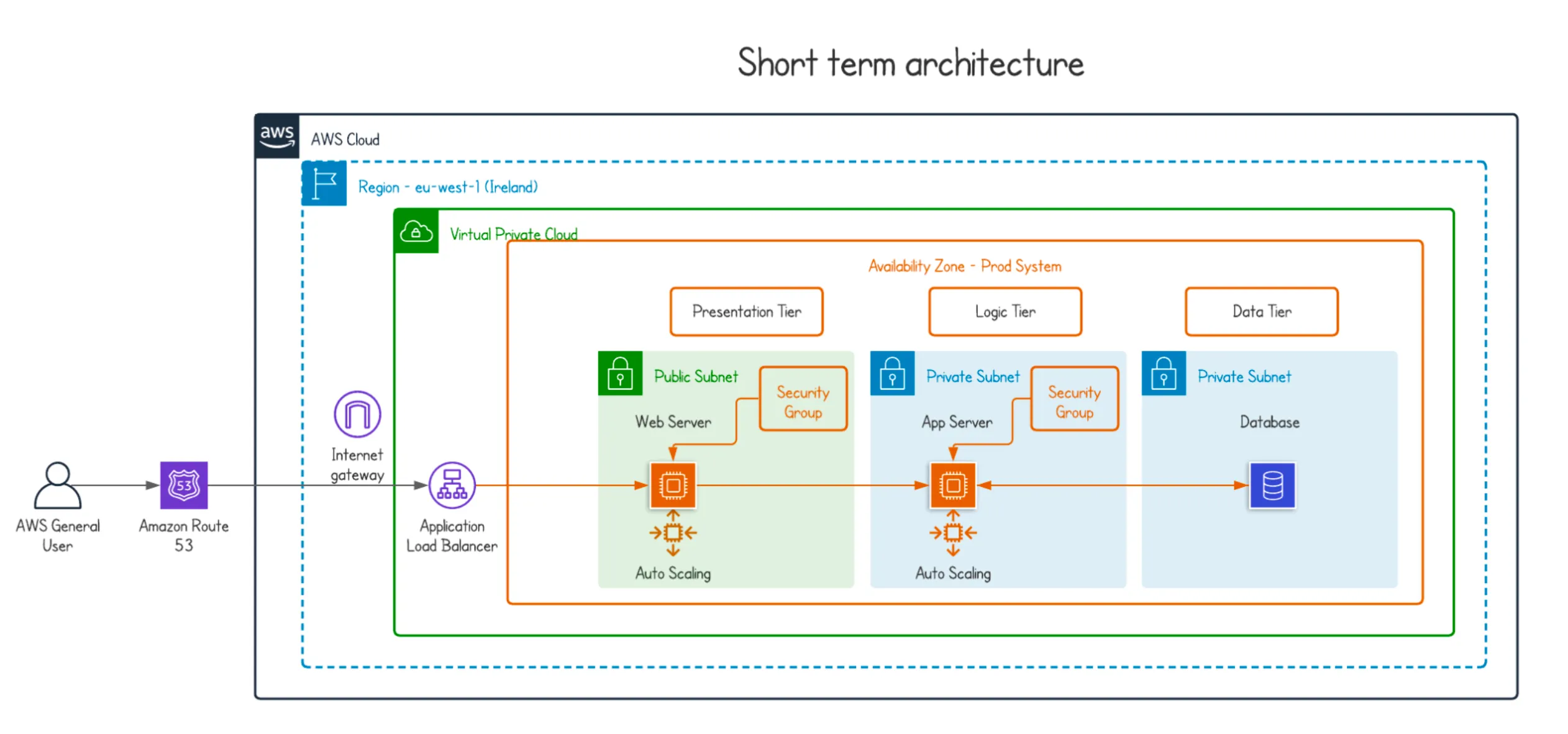
I reviewed the CloudFormation stack and made recommendations to make the app easier to scale, more reliable, more secure and highly available, while keeping an eye on cost. A few of the services are new to your stack, so I explain what each one does and why it’s there.
I propose a three tier web application architecture: web (presentation), app (logic) and data, each separate. The tiers are independent, so you can update one without affecting the rest of the application.
- Route 53 is the entry point. It handles DNS and connects user requests to your AWS infrastructure. There are no upfront fees, and you pay per resolved query. See Route 53 pricing.
- Route 53 health checks can monitor any resource in the architecture and notify you by email (through a CloudWatch alarm and SNS) when something fails.
- The NACLs (Network Access Control Lists) in your template use the default configuration, which allows all inbound and outbound traffic. Define what traffic your app actually receives, and avoid wide port ranges or overly permissive rules.
- Use NACLs together with your security groups inside the VPC to add a second layer of security.
- An Application Load Balancer (ALB) sits at the entry point of the VPC and routes requests to the web server in the public subnet. It runs health checks and only sends traffic to healthy instances. It also adds a security layer, because the web server only accepts traffic coming from the ALB.
- Make the ALB listen on HTTPS only. You’ll need to update the web server configuration and set up an SSL/TLS certificate.
- Add an Auto Scaling group to the web server, with a minimum of 1 instance running. If the instance fails, the group replaces it. If user requests grow, it adds instances automatically.
- Do the same in the private subnet where the app tier (still in development) will live. You can try spot instances there to reduce costs until you define the workload and how it integrates with the presentation layer.
- For the data tier I picked a generic database, either relational or NoSQL, because not every database fits every business. If you have a defined schema and data integrity matters, go with a SQL database. If your data has no fixed schema, needs no joins or complex transactions, and has to scale faster, DynamoDB fits better.
- For costs, create a billing alarm based on your monthly budget. Use AWS Budgets to set custom budgets that alert you when cost or usage goes over, and AWS Cost Explorer to track cost and usage over time with detailed billing data.
c) Long term alternatives (optional)
The ask: propose high level alternatives for the longer term, as the web application becomes more successful.
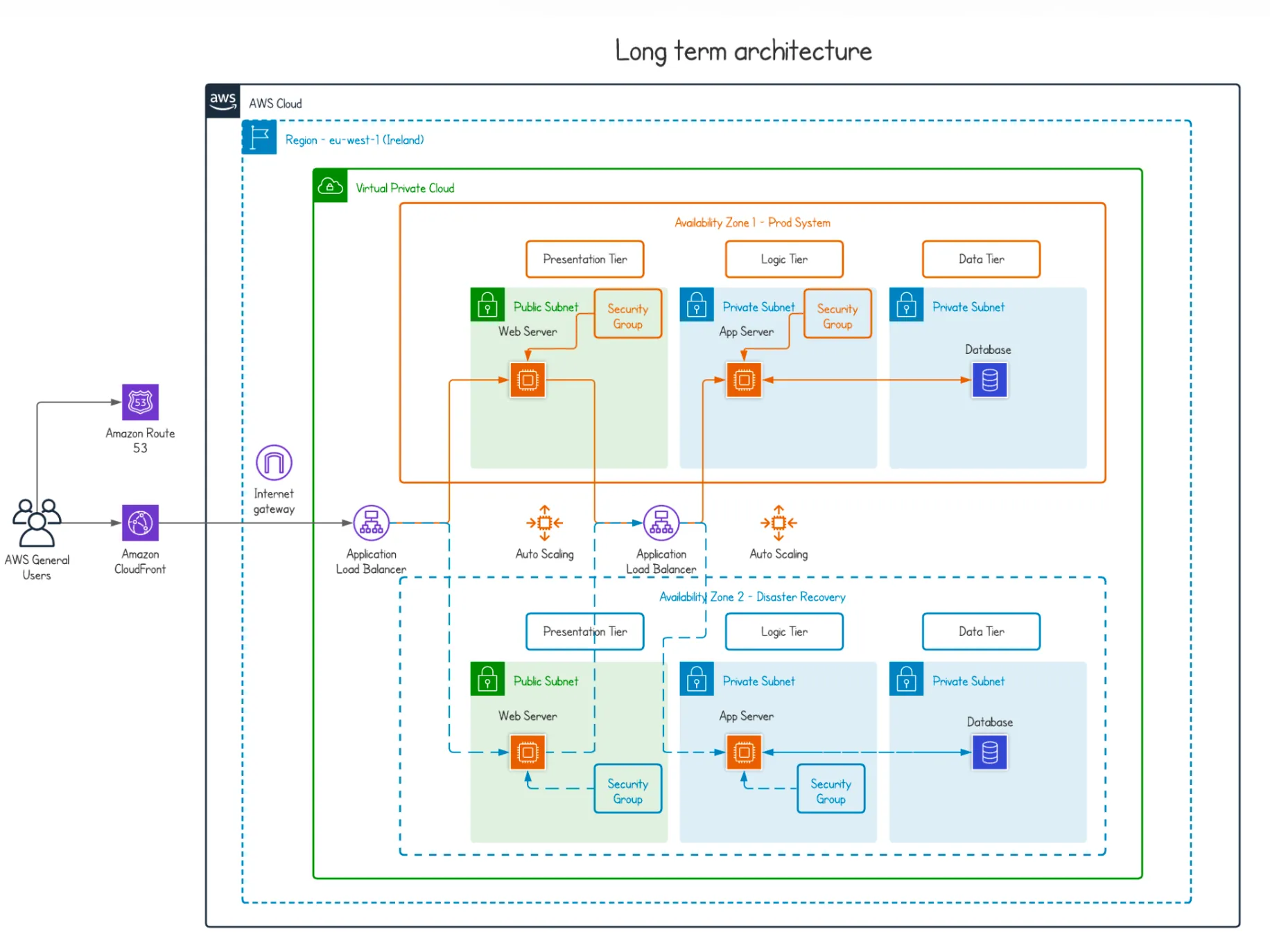
- Keep the three tiers and run the infrastructure in 2 Availability Zones for high availability. If one AZ has problems, you route traffic to the healthy one.
- Add a CDN like CloudFront to cache the static content from the web tier. It gives you low latency, high transfer speeds and security features, and traffic travels over the AWS backbone instead of the public internet.
- Put AWS WAF in front of CloudFront to filter malicious requests. AWS Shield Standard is included by default and covers DDoS protection.
- Add an internal ALB between the web tier and the app tier. It costs extra, but it decouples the tiers, reduces dependencies between them and lets each one scale faster. It pays off in the long run.
- Keep Auto Scaling on the web and app servers, as in the short term design. Capacity adjusts to demand to keep performance steady at the lowest cost. For example, you can scale on CPU usage. See EC2 Auto Scaling features.
- Use EBS volumes for the EC2 instances and take monthly snapshots as an OS backup. Amazon Data Lifecycle Manager can automate the snapshots.
- For a relational data tier, use RDS with Multi-AZ and automatic failover, or Aurora. Aurora is MySQL and PostgreSQL compatible, built for the cloud and highly available by design.
- For a NoSQL data tier, I’d go with DynamoDB. It’s fast, scales well and replicates data across Availability Zones.
- Use CloudWatch to monitor the whole stack (applications, infrastructure and services) and centralize your logs. It also helps you understand how the infrastructure behaves.
- Store the logs in S3 so they’re in one place when you need to investigate a failure. S3 storage classes and lifecycle rules move older logs to cheaper tiers.
- Use IAM to control who is authenticated (signed in) and authorized (has permissions) to use your resources. You get granular control and better security.
 Hope this helps, and good luck with your interview. 🚀